- 简体中文
- English

Visual Style Guide for Game Art: Ensuring Consistency, Efficienc
Visual Style Guide for Game Art: Ensuring Consistency, Efficiency, and Quality
In game art production, a Visual Style Guide is a crucial tool to ensure consistency, scalability, and efficient collaboration across the project. By defining clear standards and an example library, the team can maintain a consistent style throughout the project lifecycle, reducing repeated discussions and rework.
1. Mood and Atmosphere
Core principle: Define the overall game style, such as leaning toward realism, hybrid styles, cartoonish, or fully realistic approaches.

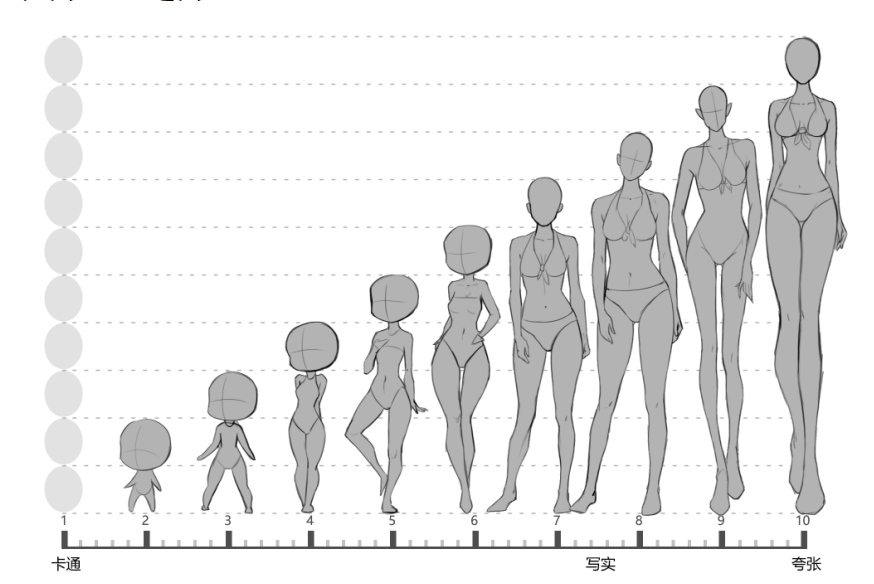
Style characteristics: Specify character proportions, line styles, color palettes, material textures, and lighting approaches.
Mood Board: Use real photos or reference illustrations to convey the player experience you want, such as uplifting, cozy, humorous, or tense and thrilling.
Keyword definition: Summarize key elements such as color, material, form, detail, and mood, e.g., “fresh colors, cute forms, clean and realistic materials, refined detailing, positive overall intention.”
2. Modular Guidelines
Character module: proportions, head-to-body ratio, facial feature style, clothing and accessories, motion expression, core facial expressions.
Prop module: shape design, functional and visual association, size adaptability, material texture.
Environment module: camera perspective standards, architectural style, decorative elements, background color tone.
UI module: icon style, button design, font and typography standards.
Each module should ideally include reference images for clarity.
3. Drawing Methods and Technical Standards
2D vs 3D: Specify which modules use 2D illustration and which use 3D modeling or rendering.
Workflow: Sketch → Line art → Color → Refinement → Action / orthographic views / dynamic effects.
Phase examples: Provide visual references for each step to ensure adherence to standards at each stage.
4. Delivery and Naming Standards
Asset naming: Use consistent rules, e.g., CharacterName_State_VersionNumber, to facilitate management and retrieval.
File formats: Specify submission formats (e.g., layered PSD, transparent PNG) to ensure assets are directly usable in development.
Resolution standards: Define drawing dimensions according to project requirements and provide high-resolution versions to ensure clarity.
5. Example Library and Comparison Guidelines
Correct examples: Provide images of characters, props, and environments that adhere to the overall style.
Incorrect examples: Show non-compliant cases and explain the deviation, e.g., abnormal proportions, color mismatch, or inappropriate materials.
Comparison analysis: Annotate key points for each example to help the team quickly understand standards and deviations.
6. Maintenance and Iteration
Version management: Continuously update the style guide throughout the project; refer to it when adding new characters or props.
Ongoing training: Regularly review the guide with team members to ensure new staff can quickly adapt.
Feedback mechanism: Encourage the team to report unclear style points during production and continuously refine the standards.
Tip: Uowls provides templates for project visual style guides. Contact us via the website for access to reference materials.
About UOWLS
UOWLS is a game art outsourcing studio supporting casual and mobile game teams with character art, environment art, props, illustrations, UI, icons, Spine animation, promotional video visuals, 3D characters, and 3D environments.
We support teams across different production stages, from early visual exploration and small-scale art tests to full production and ongoing content updates after launch.
Our experience covers Merge games, Match-3 games, simulation games, dress-up games, cooking games, Bingo games, casual SLG projects, life simulation games, and other stylized casual mobile games.
UOWLS has supported multiple mature live game projects, gaining practical experience in style consistency, scalable production, and long-term art content updates for casual and mobile game teams.
Visual Style Guide for Game Art: Ensuring Consistency, Efficienc
Visual Style Guide for Game Art: Ensuring Consistency, Efficiency, and Quality
In game art production, a Visual Style Guide is a crucial tool to ensure consistency, scalability, and efficient collaboration across the project. By defining clear standards and an example library, the team can maintain a consistent style throughout the project lifecycle, reducing repeated discussions and rework.
1. Mood and Atmosphere
Core principle: Define the overall game style, such as leaning toward realism, hybrid styles, cartoonish, or fully realistic approaches.
Style characteristics: Specify character proportions, line styles, color palettes, material textures, and lighting approaches.
Mood Board: Use real photos or reference illustrations to convey the player experience you want, such as uplifting, cozy, humorous, or tense and thrilling.
Keyword definition: Summarize key elements such as color, material, form, detail, and mood, e.g., “fresh colors, cute forms, clean and realistic materials, refined detailing, positive overall intention.”
2. Modular Guidelines
Character module: proportions, head-to-body ratio, facial feature style, clothing and accessories, motion expression, core facial expressions.
Prop module: shape design, functional and visual association, size adaptability, material texture.
Environment module: camera perspective standards, architectural style, decorative elements, background color tone.
UI module: icon style, button design, font and typography standards.
Each module should ideally include reference images for clarity.
3. Drawing Methods and Technical Standards
2D vs 3D: Specify which modules use 2D illustration and which use 3D modeling or rendering.
Workflow: Sketch → Line art → Color → Refinement → Action / orthographic views / dynamic effects.
Phase examples: Provide visual references for each step to ensure adherence to standards at each stage.
4. Delivery and Naming Standards
Asset naming: Use consistent rules, e.g., CharacterName_State_VersionNumber, to facilitate management and retrieval.
File formats: Specify submission formats (e.g., layered PSD, transparent PNG) to ensure assets are directly usable in development.
Resolution standards: Define drawing dimensions according to project requirements and provide high-resolution versions to ensure clarity.
5. Example Library and Comparison Guidelines
Correct examples: Provide images of characters, props, and environments that adhere to the overall style.
Incorrect examples: Show non-compliant cases and explain the deviation, e.g., abnormal proportions, color mismatch, or inappropriate materials.
Comparison analysis: Annotate key points for each example to help the team quickly understand standards and deviations.
6. Maintenance and Iteration
Version management: Continuously update the style guide throughout the project; refer to it when adding new characters or props.
Ongoing training: Regularly review the guide with team members to ensure new staff can quickly adapt.
Feedback mechanism: Encourage the team to report unclear style points during production and continuously refine the standards.
Tip: Uowls provides templates for project visual style guides. Contact us via the website for access to reference materials.
About UOWLS
UOWLS is a game art outsourcing studio supporting casual and mobile game teams with character art, environment art, props, illustrations, UI, icons, Spine animation, promotional video visuals, 3D characters, and 3D environments.
We support teams across different production stages, from early visual exploration and small-scale art tests to full production and ongoing content updates after launch.
Our experience covers Merge games, Match-3 games, simulation games, dress-up games, cooking games, Bingo games, casual SLG projects, life simulation games, and other stylized casual mobile games.
UOWLS has supported multiple mature live game projects, gaining practical experience in style consistency, scalable production, and long-term art content updates for casual and mobile game teams.